

With the current partial government shutdown going on, TSA agents are not being paid and there are increasing reports of longer and longer wait times at TSA security checkpoints at airports around the country. As such, I wanted to discuss one way you may be able to speed up your security check, if you’re flying anytime soon.
For a little while now, the Transportation Security Administration (TSA) in the United States has rolled out its free ‘Touchless ID’ program that is supposed to further speed up the security check for air travelers. However, it seems as though there’s still many people that are unfamiliar with this program, or even if they know about it, are unsure whether they are eligible or how to enroll. I wanted to discuss all these things in this post and provide some instructions.
- What is the ‘Touchless ID’ Program and how it will benefit you
- Touchless ID Requirements and Restrictions
- How to Enroll in the Touchless ID Program
- Summary
What is the ‘Touchless ID’ Program and how it will benefit you
For those unfamiliar with Touchless ID, this is essentially the next evolution of TSA PreCheck.
Briefly, TSA PreCheck is a government memberhsip prgram (meaning there’s a fee) where the TSA will do a background check and an interview to assess your risk level, and if you’re deemed low risk enough, you can receive expedited security check, essentially by omitting some of the normal requirements. That includes leaving liquids and computers in your bag, for instance, or not having to take boots off. You can read my full post about TSA PreCheck (and Global Entry)
Despite the expedited security, and a separate lane with generally a shorter line, you still need to verify your identity with a TSA officer before getting to the actual screening. And while these days you don’t typically need to even show a boarding pass anymore, you do need to show your ID.
This last requirement is supposed to go out the window with Touchless ID: once you opt in, you shouldn’t need to show any ID document anymore. Instead, a picture of you is taken, compared to biometric data in TSA’s database, and you’re let through. Think of it as the Global Entry process at immigration, when entering the US: these days, you walk up to the kiosk, have a picture taken, and you’ll get a message saying ‘Processing Complete’. Touchless ID is supposed to do the same at the security check.
But the biggest benefit? Most airports should have a separate lane for Touchless ID, and these days the line for it is (still) shorter than the line for TSA PreCheck. So ultimately, this should provide for a faster security screening than ‘normal’ TSA PreCheck currently does.
And, it is completely free for those that already have TSA PreCheck!
Touchless ID Requirements and Restrictions
The TSA’s Touchless ID Program is not available to every single traveler, and even those that are eligible, may not be able to use it every single time they fly. Here are the requirements and restrictions that apply with the Touchless ID Program.
Requirements of Individual Air Travelers to participate in Touchless ID
Unfortunately not everybody can participate in Touchless ID. There are a few basic requirements for ai travelers that wish to partake in this technology:
- You need to have a TSA PreCheck membership. Yes, you read that right: you need to have paid the fee for TSA PreCheck and successfully gotten through the background check and interview. If you don’t have TSA PreCheck, Touchless ID will also not work. Keep in mind that TSA PreCheck is only available to permanent residents of the USA, including US Citizens and green card holders. If you’re in the US by any other permit or visa (including tourists with an ESTA), then you’re not eligible for TSA PreCheck or Touchless ID.
- You need to opt in to use Touchless ID. The way Touchless ID enrollment works, you need to consent to the storage and use of your ID and biometric information before you can actually use that data for the purposes of Touchless ID. You do this NOT through the TSA PreCheck website, but rather through the airline you’re flying.
- To opt in, you will also need to be a member in the loyalty program of the airline you’re flying. Because you enroll for Touchless ID through the airline you’re flying with, you need to have an account with that airline, meaning you’re enrolled in their loyalty program. This is free, and anyway would be a good idea sicne you’ll be able to earn miles for your travel. Once you enroll in their loyalty program, you need to enter and save your TSA PreCheck Known Traveler Number (KTN or PASS ID) and your passport details. Then, you can opt in for Touchless ID as well. Details on how to do this will follow down below.
- You check-in through your airline’s app, and ensure the Touchless ID badge is displayed on your digital boarding pass. This is an important one: you must have a mobile boarding pass that doesn’t just show the normal ‘TSA PreCheck’ icon, it’s a special badge that indicates you can use the Touchless ID lane. It looks like this:

If you (1) entered all the correct information, including your KTN and passport, into your airline’s loyalty program account and also (2) opted in through that account, then (3) checking in and obtaining a (4) mobile boarding pass through your airline’s app should display that Touchless ID badge.
The Airlines that Participate in Touchless ID
Not every airline participates in Touchless ID. Currently, only a selection of US Airlines participate:
- Alaska Airlines
- American Airlines
- Delta Air Lines
- Southwest Airlines
- United Airlines
The Airports that Participate in Touchless ID
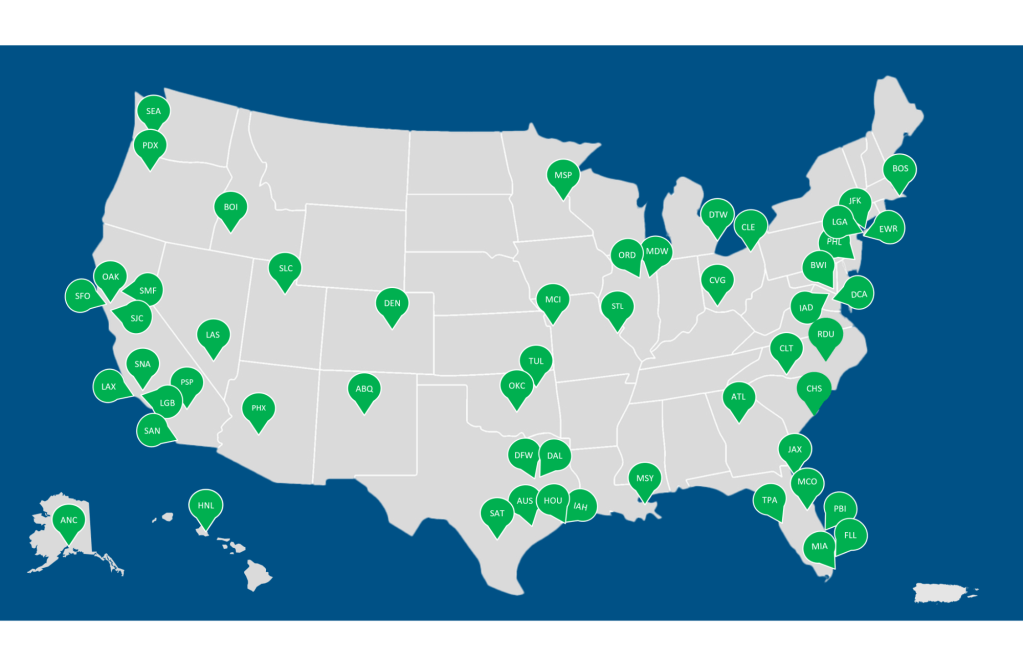
Not every airport participates in Touchless ID. You can expect all major US airports to have the option, but that leaves out a lot of middle-sized and smaller airports. Also, keep in mind that even if an airport supports Touchless ID, it will only support it for the airlines that participate. For example, even if New York JFK supports Touchless ID, if you’re flying JetBlue, it still won’t be an option for you since JetBlue isn’t participating in Touchless ID currently.
According to the TSA, by Spring 2026, Touchless ID should be available at 65 airports through the continental US, Alaska and Hawaii:
How to Enroll in the Touchless ID Program
So how do you actually enroll in Touchless ID? Iv’e already discussed the requirements to do this, but here are some step-by-step guides, per airline. Remember, you need to be a TSA PreCheck member for this to work!
Alaska Airlines
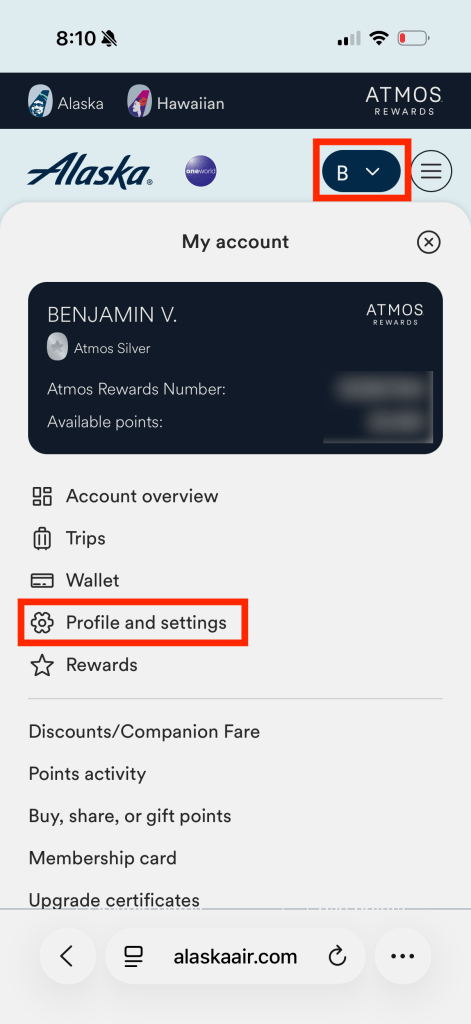
- Open a browser and navigate to the Alaska Airlines website
- Ensure you are signed into your Alaska Atmos account.
- Navigate to your profile, and go to Profile and Settings.
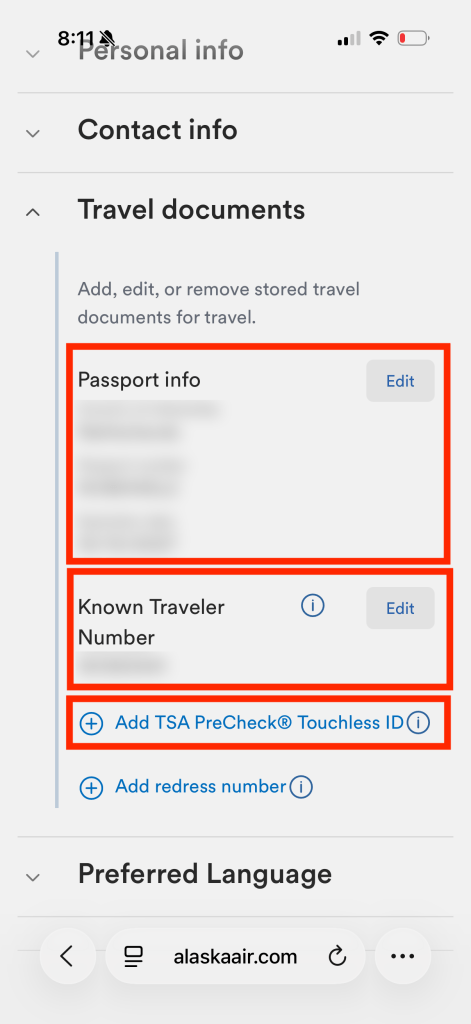
- Go the Travel Documents.
- Clock the ‘+’ icons to add in your passport info and KTN.
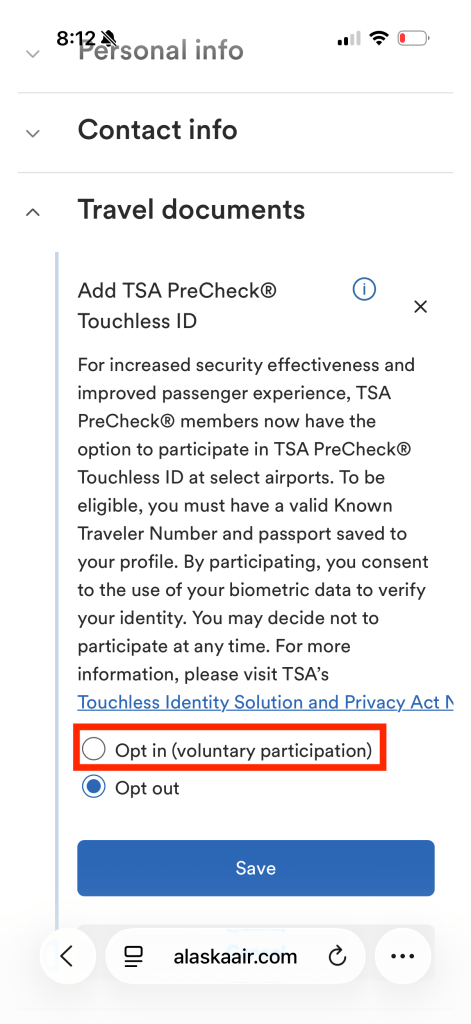
- Scroll down to where it says ‘Add TSA PreCheck Touchless ID’ and click it.
- Select the radio button for ‘Opt In’, and hit save.
- You’ll get a note stating you opted in and under TSA PreCheck it will now say ‘opted in’ with a green checkmark.
American Airlines
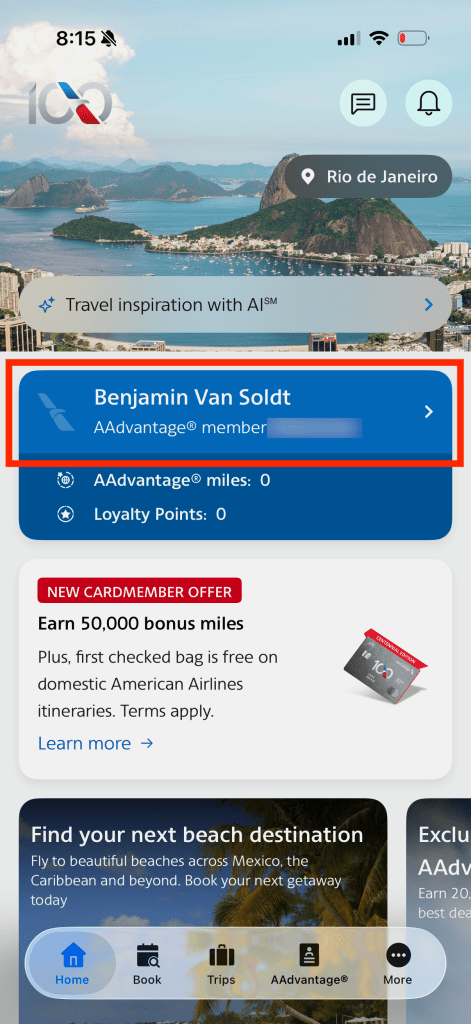
- Open the American Airlines app and log into your AAdvantage account.
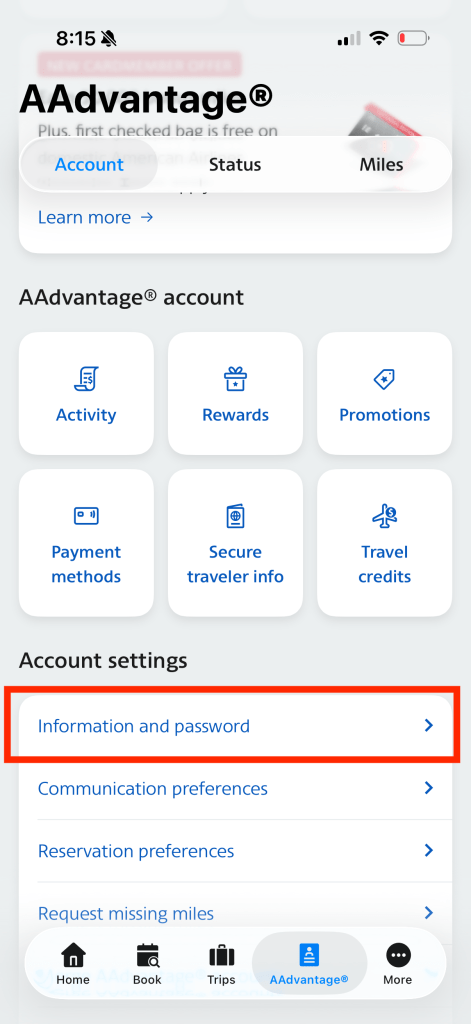
- Navigate to the AAdvantage tab at the bottom of the app.
- Scroll down and go to ‘Information and password’. A large form will open up.
- Here, first enter your passport details and KTN.
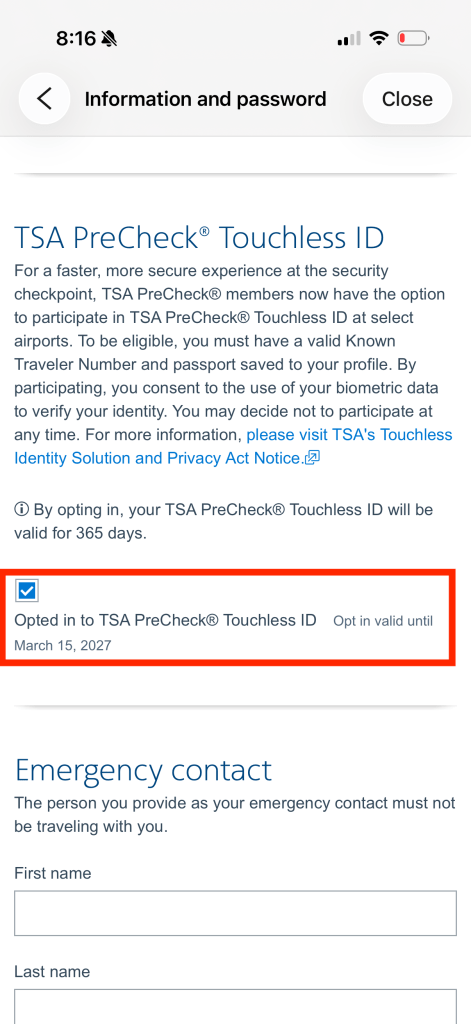
- Scroll down and save for the Touchless ID ‘opt in’ option to bcome available.
- After having saved the passport details and KTN and cleared any errors that may have sprung up, you can now click the ‘opt in’ checkbox for Touchless ID. Hit save.
Delta Air Lines
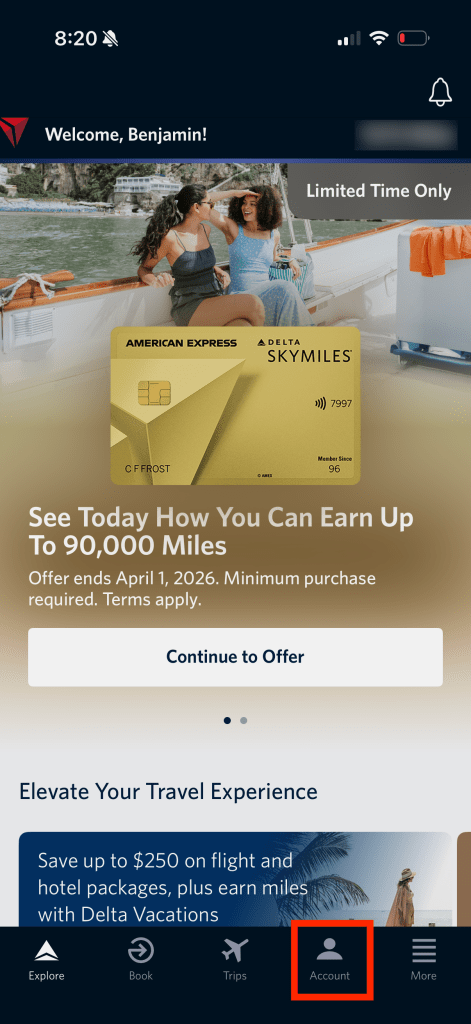
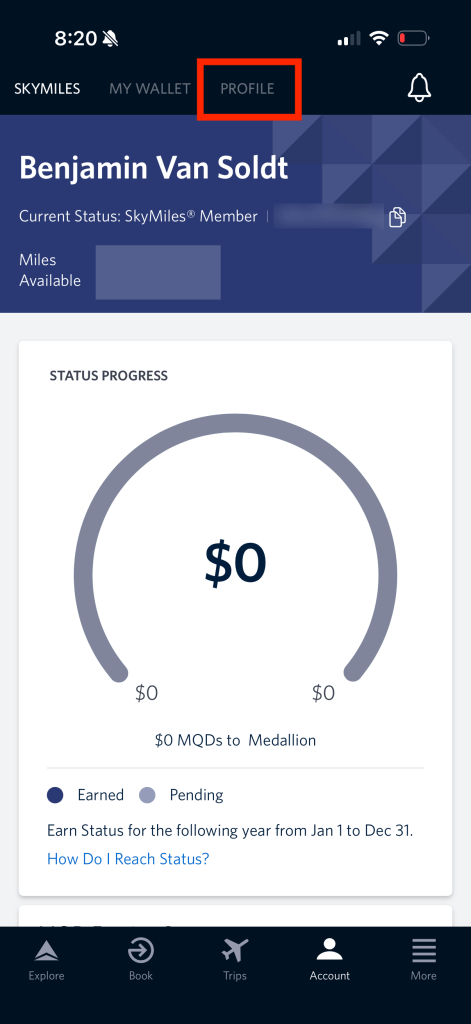
- Open the Delta Air Lines app and log into your SkyMiles account.
- Navigate to the Account tab at the bottom of the app.
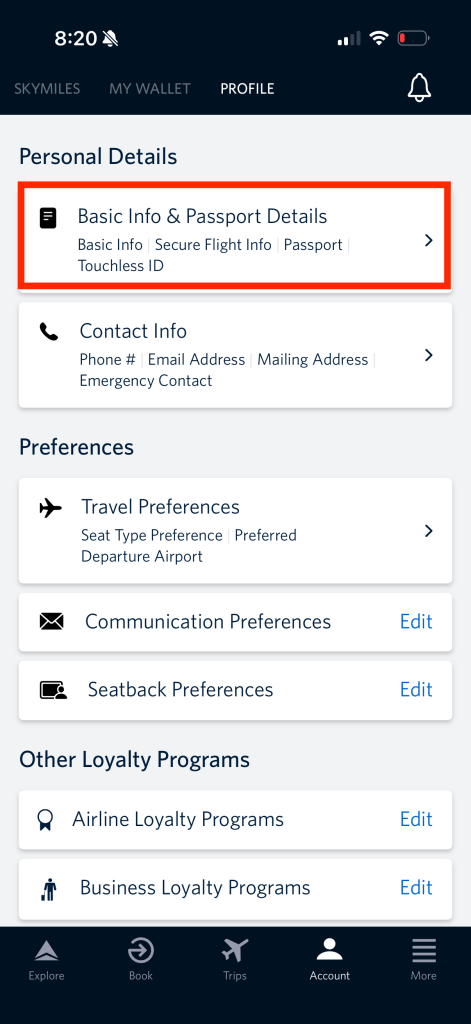
- Then navigate to the Profile screen at the top of the app.
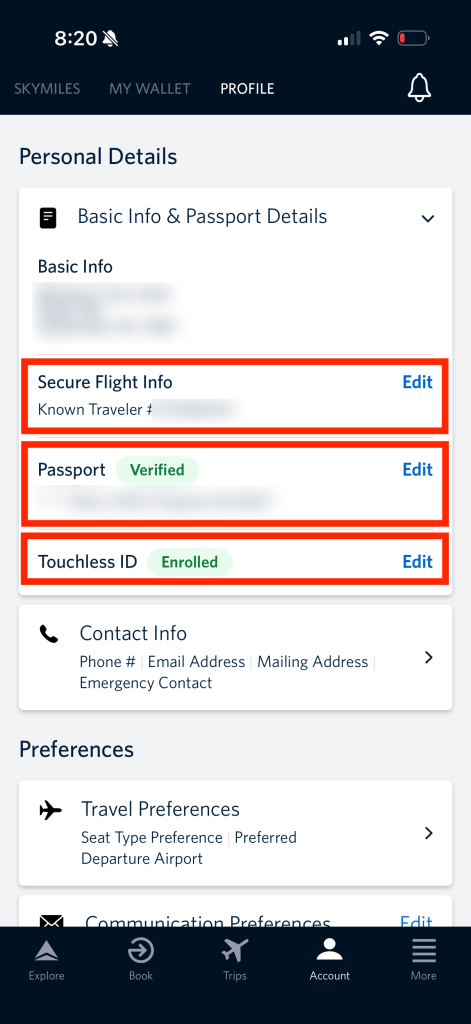
- Go into the Basic Info and Passport Details section.
- Add your passport details and KTN. The latter can be added in the ‘Secure Flight Info’ line.
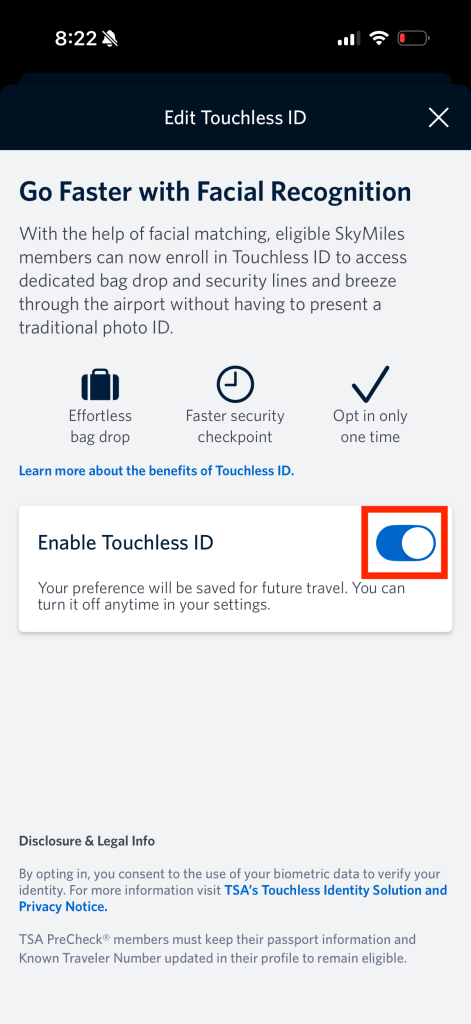
- Once these are added, you can select Touchless ID and hit the slider to opt in.
- Once opted in, you’ll see a green ‘enrolled’ badge next to ‘Touchless ID’.
Southwest Airlines
Full disclosure, I never got this to work because the Southwest app would not allow me to submit the scanned ID page from my passport, which is a requirement to enroll in Touchless ID. That said, the steps are otherwise straightforward.
- Open the Southwest Airlines app and log into your Rapid Rewards account.
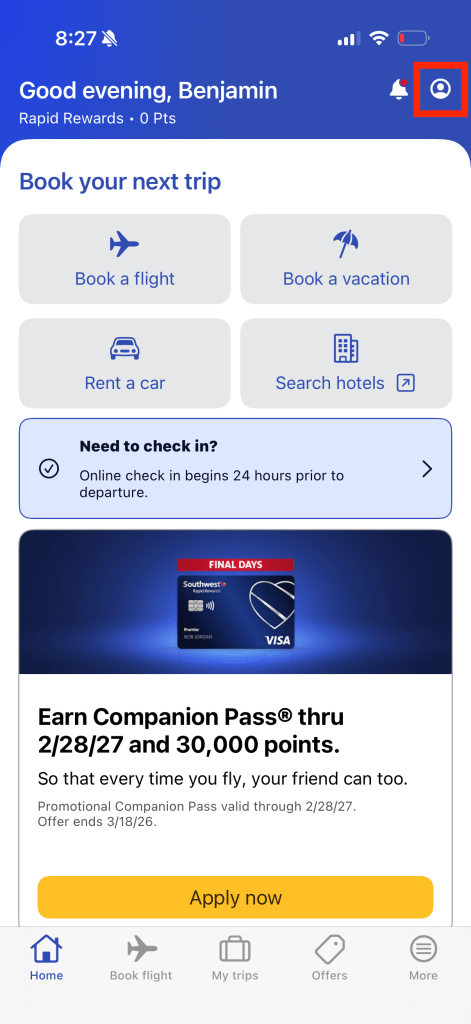
- Go to your Rapid Rewards account by clicking the ‘user’ icon in the top right.
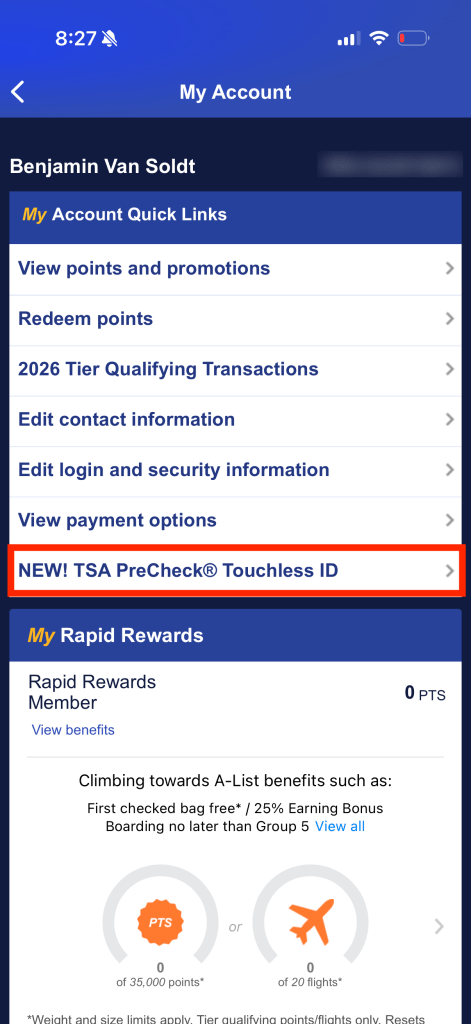
- Find the ‘NEW! TSA PreCheck Touchless ID’ line and hit it.
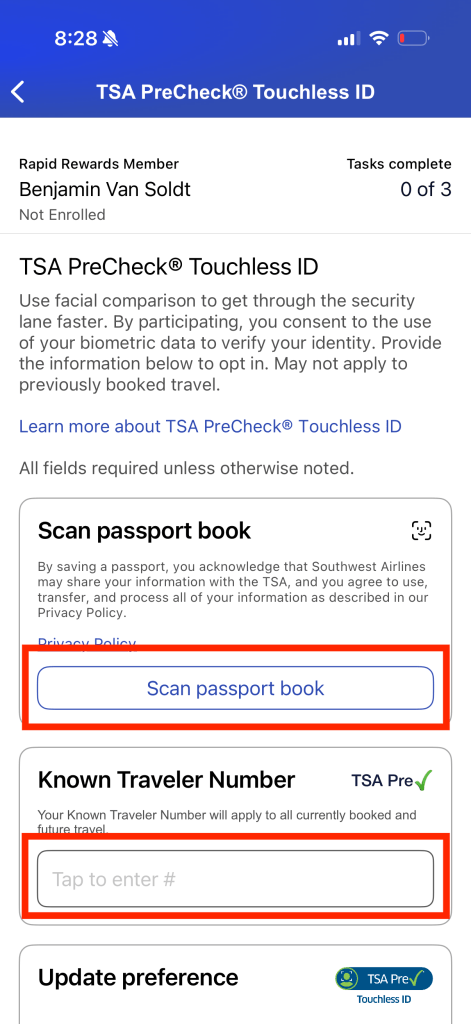
- Fill out the required information:
- Scan the ID page for your passport in Step 1, and submit it when read.
- Then enter the KTN in the text field under Step 2.
- When all is well, you can hit the slider in Step 3 to opt it.
United Airlines
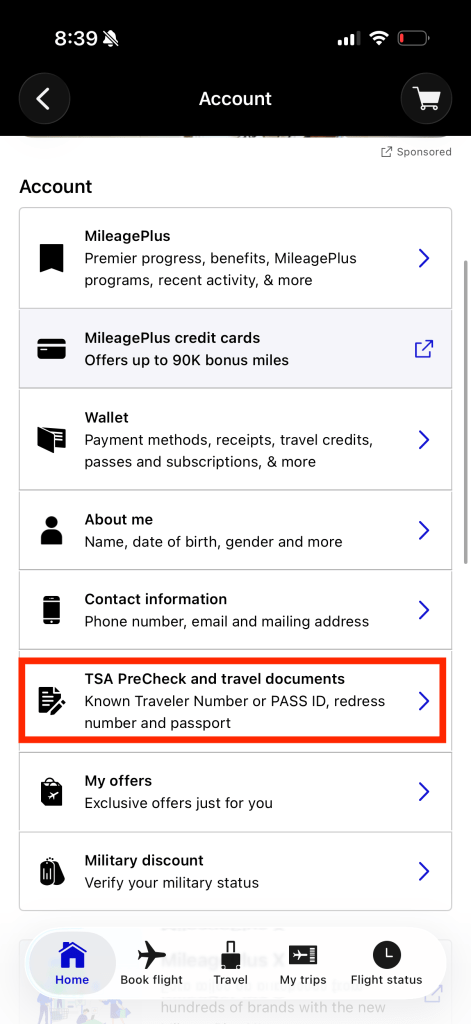
- Open the United Airlines app and log into your MileagePlus account.
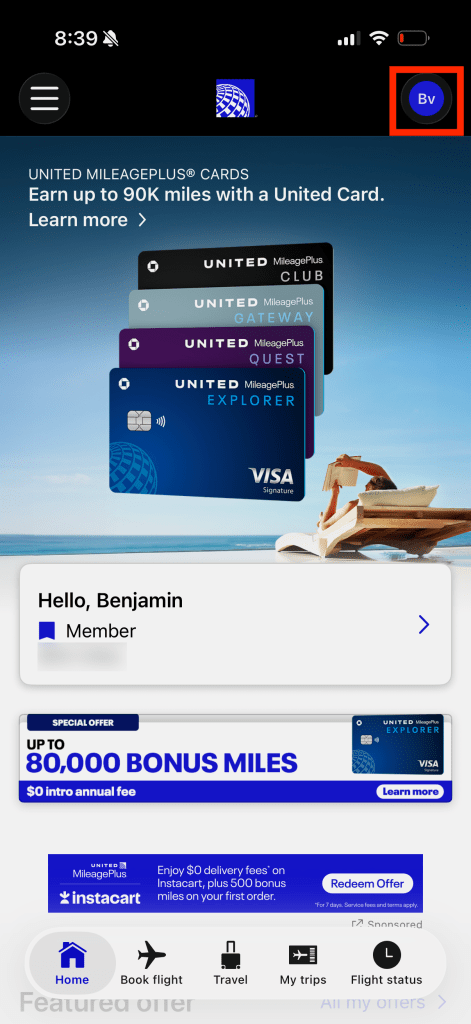
- Hit the ‘user’ icon on the top right of the app interface.
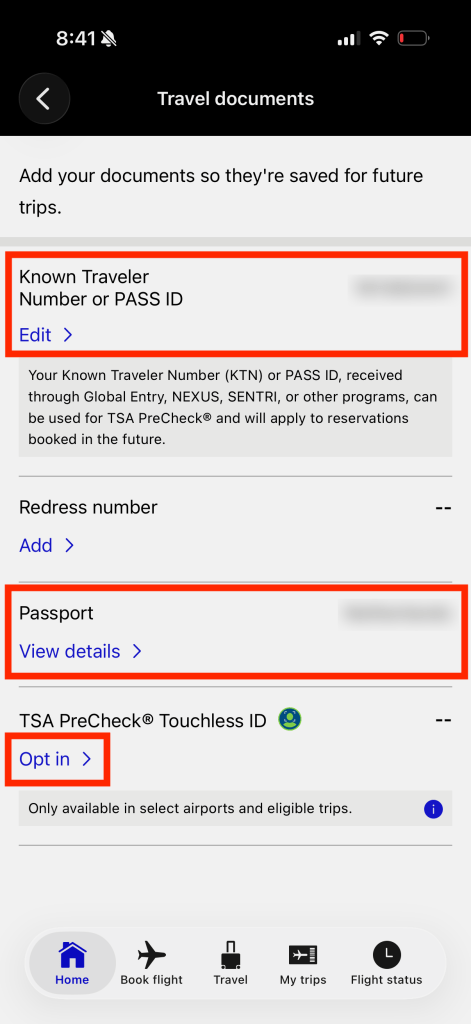
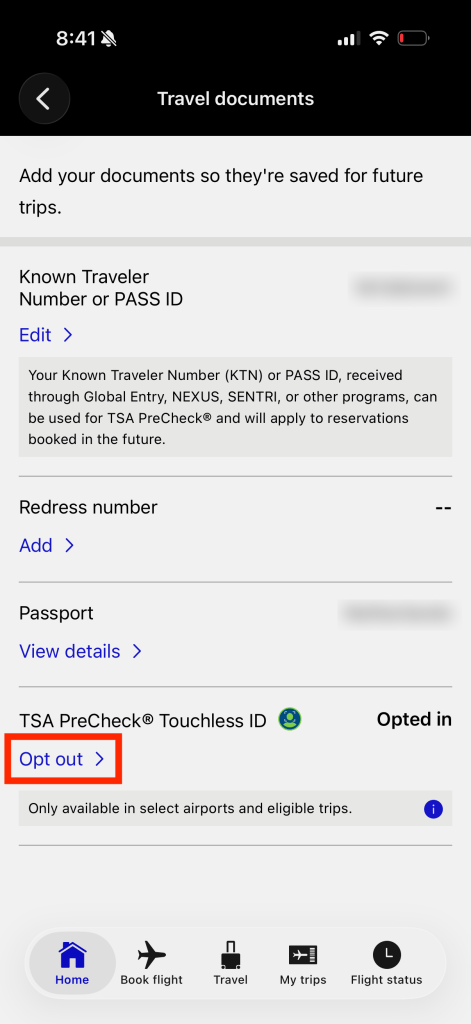
- Scroll down amongst the various account settings until you find the ‘TSA PreCheck and travel documents’ line, and select it. You’ll be asked to verify your identify by logging in, probably.
- Ensure your KTN and passport details are provided, then scroll down and lick ‘opt in’.
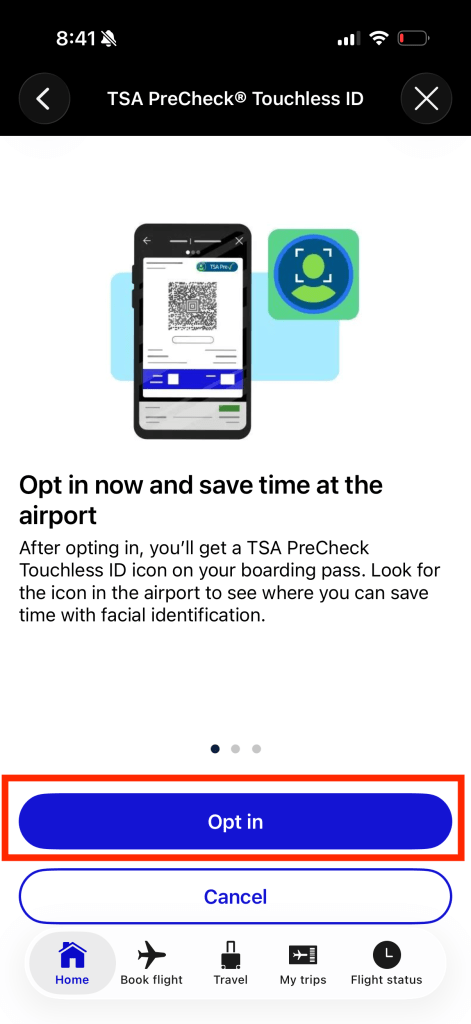
- You’ll be presented a page with info on the program, hit ‘Opt In’.
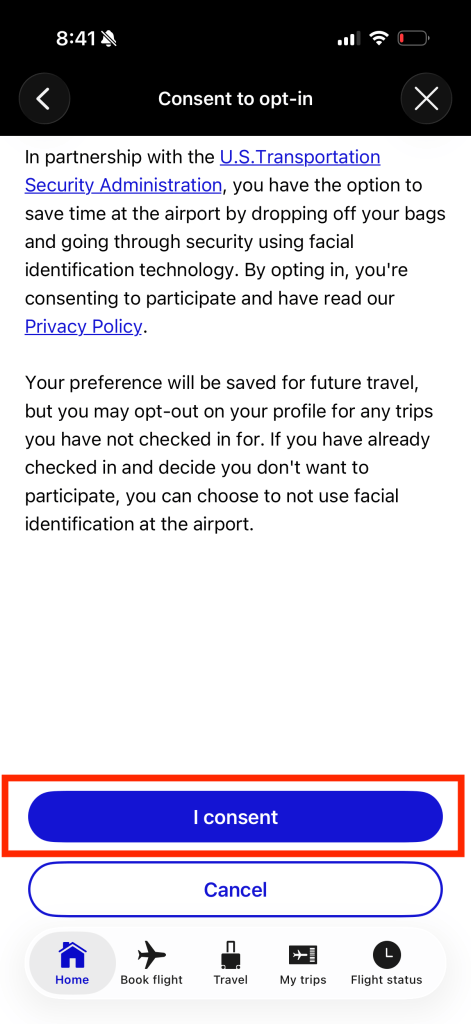
- On the next page you’ll be specifically asked to consent, so hit ‘I consent’.
- You’ll be brought back to the settings page, except now under ‘TSA PreCheck Touchless ID’ the ‘opt in’ will have changed into ‘opt out’.
Summary
TSA PreCheck has rolled out its Touchless ID option since a little while, but many don’t realize this is an option. This will allow you bypass providing an ID document at the TSA security checkpoint, but even better is that it will likely allow you to enter a separate lane with an even shorter line than TSA PreCheck. It could speed up the security screening for you. However, to use the Touchless ID you will need to have enrolled (and paid the fee) for TS PreCheck, you’ll need a loyalty account with the airline you’re flying, in which you saved your KTN and passport info. That allows you to opt in to the program, which in turn will place the special TSA PreCheck Touchless ID badge on your mobile boarding pass, after checkin.


 Points to Seats
Leave a reply to What are TSA PreCheck and Global Entry, and why you should definitively get it – Points to Seats Cancel reply